

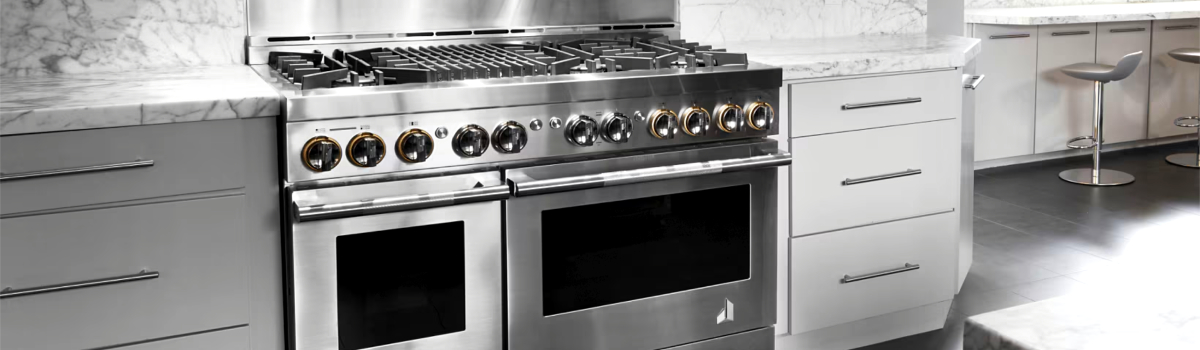
A well-tuned JennAir range should heat fast, cook evenly, and respond the moment you turn a knob or tap the panel. When it doesn’t, you feel it in every overcooked steak and underbaked tray of cookies. This guide walks you through the most common JennAir range issues—what they look like, why they happen, how to fix the simple stuff yourself, and what to do to keep the problem from coming back. It’s written in clear, everyday language and alternates short lists with easy-to-scan paragraphs for a smooth read.
Quick safety note: Always disconnect power at the breaker and shut off gas before hands-on work. If you smell gas, stop and call your utility immediately.
1) Gas Burners Won’t Ignite
What it looks like
You hear clicking, but there’s no flame—or the burner lights only after several tries.
Why it happens
Moisture from boil-overs, food debris on the burner cap or ports, misaligned caps, or a weak spark from the igniter. Less commonly, a clogged or kinked gas supply, or a faulty spark module.
DIY fix
Lift off the grate and burner cap. Make sure the cap sits flat and centered on the base. Wipe moisture from the igniter tip and clean ports with a soft brush or a wooden toothpick (never metal). Try another burner: if others ignite, your gas supply is likely fine. Let everything dry completely, then test again.
Prevention
After simmer spills, turn the burner off and leave the knob in the off position while you wipe up. Keep caps correctly seated every time you reassemble after cleaning—one small tilt is enough to block ignition.
2) Weak, Yellow, or Sputtering Flame (Gas)
What it looks like
Flames lift, turn yellow, or make a noisy “whoosh.” Pots take longer to boil and heat feels uneven.
Why it happens
Partially blocked burner ports, cap not centered, or poor air-to-gas mix from grease buildup around the air shutter. Outdoor make-up air or HVAC drafts can also disturb the flame.
- DIY quick checks
- Reseat the burner cap so it’s flat and snug.
- Brush debris out of the ring of ports; avoid enlarging them.
- Close nearby windows/vents creating a direct draft over the cooktop.
Prevention
Wipe the burner head regularly and avoid soaking it overnight. If you deep-clean, dry completely before reinstalling—trapped moisture makes flames lazy and yellow.
3) Surface Element Won’t Heat (Electric / Induction)
What it looks like
You turn the knob or slider and the element stays cold. On induction, pan detect may blink or shut off.
Why it happens
For radiant electric, a failed element, loose connection, or a bad infinite switch. On induction, use of a non-magnetic pan, pan too small for the zone, or a child-lock setting.
DIY fix
Confirm the breaker isn’t tripped. For induction, test with a flat, magnetic pan that covers most of the ring. For radiant glass-top, look under the glass for obvious element damage only if you’re comfortable removing screws; otherwise, stop—exposed edges are fragile and live wiring is a risk.
Prevention
Use induction-ready cookware (a magnet should stick). Keep pans flat; warped bases cause poor sensing and weak heating.
4) Oven Won’t Heat (Gas or Electric)
What it looks like
Bake never starts, or the oven sits at room temperature while the display shows “Preheating.”
Why it happens
On gas ovens, a tired bake igniter often glows but doesn’t draw enough current to open the safety valve. On electric models, a broken bake element or thermal fuse can leave the cavity cold.
- DIY steps (simple)
- Verify the correct mode (Bake vs. Broil vs. Warm).
- Check for error messages and a locked control panel.
- For gas: look through the oven window—does the igniter glow at all? If it glows forever without flame, the igniter is likely weak.
- For electric: inspect the bake element—any visible blistering or breaks means replacement.
Prevention
Avoid slamming oven doors or pulling heavy cookware across elements. Gentle use reduces shock and extends component life.
5) Oven Temps Are Off (Over- or Under-Baking)
What it looks like
Recipes you trust keep failing: cookies brown too fast, roasts take an extra 20 minutes, or the oven cycles wildly.
Why it happens
Sensor drift, rack placement, blocked airflow with oversized pans, or heavy door opening during preheat. In some cases, calibration is needed after a power outage or control replacement.
DIY fix
Give the oven a full, uninterrupted preheat. Place an inexpensive oven thermometer in the center and test for 20–30 minutes. If the average is consistently high or low, use the control’s temperature offset (calibration) setting, usually in ±5°F steps, to nudge it back to true.
Prevention
Preheat fully, keep racks centered, and avoid crowding the oven walls with giant sheet pans that choke convection.
6) Convection Fan Not Spinning or Noisy
What it looks like
Convection mode bakes like regular bake, or you hear a scraping/grinding behind the rear panel.
Why it happens
Grease or foil scraps caught in the fan shroud, a loose fan blade, or a failing motor bearing. Sometimes the fan is fine, but the mode is set to “traditional bake” by mistake.
- DIY quick win
- Double-check the display actually shows a convection mode (e.g., “Convection Bake/Roast”).
- If noise appears only with convection on, stop use and schedule repair—the panel needs to come off to remove debris or replace the motor safely.
Prevention
Skip loose foil sheets near the rear wall; use rimmed pans to keep food bits contained.
7) Igniter Keeps Clicking After Flame Appears (Gas Cooktop)
What it looks like
Burner lights but the rapid ticking won’t stop until you turn the knob off.
Why it happens
Wet or dirty igniter tip, moisture in the switch harness from a recent boil-over, or a knob not fully returning to the “Off” detent.
DIY fix
With power off, dry the igniter area and the spill tray beneath the top (air dry or a gentle fan). Clean the ceramic tip with a cotton swab and a touch of rubbing alcohol. Rotate the knob firmly to the off position and retest each burner.
Prevention
When a spill happens, cut power and let the cooktop dry thoroughly before relighting. Keeping caps aligned also reduces re-clicking.
8) Range Trips the Breaker or Won’t Power Up
What it looks like
Everything goes dark when you start preheating, or the control won’t light at all.
Why it happens
Shorted heating element, damaged power cord, shared circuit overload, or a GFCI outlet not suited for the load.
- DIY checks
- Make sure the range is on a dedicated, properly sized circuit (most are 240V/40–50A electric or 120V/15A for gas controls).
- Reset the breaker once. If it trips again immediately, do not keep resetting—schedule service.
Prevention
Avoid daisy-chaining the range with other high-draw appliances on the same circuit.
9) Glass-Top Scratches, Stains, or “Shadow” Rings
What it looks like
White haze, brown rings, or fine scratches that don’t wipe off.
Why it happens
Sugary boil-overs, sliding gritty cookware, or overheated residues cooked into the surface.
DIY fix
While the surface is cool, apply a ceramic cooktop cleaner and use a non-abrasive pad. For hardened sugar, a brand-new razor scraper held at a low angle can lift residue—work slowly and keep the blade flat.
Prevention
Lift pans instead of sliding, clean spills right away, and use flat, smooth-bottom cookware.
10) Self-Clean Issues (Door Won’t Lock/Unlock, Errors, Lingering Odor)
What it looks like
Self-clean won’t start, stops mid-cycle, or the door stays locked after the cycle with an error.
Why it happens
High heat stresses the door latch, sensors, and control. Power interruptions during the cycle confuse the latch position.
- DIY approach
- Give the oven time to cool completely; the latch often releases as temps drop.
- Power-cycle at the breaker for 1–2 minutes to re-home the latch.
- If the latch motor is noisy or stuck every time, it likely needs replacement.
Prevention
Use manual clean-ups for day-to-day messes and reserve self-clean for rare, heavy jobs. Remove racks before running it to avoid discoloration and warping.
11) Control Panel Not Responding
What it looks like
No beeps, buttons don’t register, or the panel shows “Locked.”
Why it happens
Control lock feature on, residue on capacitive buttons, or a control board glitch after a surge.
DIY fix
Look for a small “Lock” icon and hold the designated key combo (often 3–5 seconds) to unlock. Clean the panel with a slightly damp microfiber cloth and dry well. If still frozen, shut power off at the breaker for a minute to reboot.
Prevention
Avoid spraying cleaner directly on the panel—mist the cloth instead. Consider a surge protector (for gas models’ 120V circuits).
12) Oven Door Won’t Close Fully
What it looks like
Heat leaks from the top edge, preheat feels slow, or the light won’t turn off.
Why it happens
Bent or unseated hinges after removing the door for cleaning, or a compressed gasket that no longer seals.
- DIY check
- If you removed the door, ensure both hinge arms are locked at the same angle and fully seated in the receivers before lowering.
- Inspect the gasket all the way around; if it’s frayed or flattened, plan a replacement.
Prevention
Never use the door as a shelf for heavy cookware; even a slight bend can throw the seal off.
13) Slow, Endless Preheat
What it looks like
The oven crawls to temperature and keeps bouncing near the setpoint.
Why it happens
Wrong rack position, oversized pans blocking airflow, or using stoneware that absorbs heat during preheat. On electric models, one element may be out, leaving the remaining element to do all the work.
DIY fix
Preheat with racks already in place, use lighter pans during preheat, and verify both bake and broil elements glow (on electric) at the start of preheat—many ovens use broil assist to speed things up.
Prevention
Keep the cavity clean so sensors read accurately and airflow stays free.
Routine Care That Prevents Most Range Problems
Small habits make a huge difference. Wipe spills right after cooking—especially sugar and acidic sauces. Keep burner caps centered and dry. Every few months, remove oven racks and clean the cavity with warm soapy water; stubborn bits release after a short steam: place a pan of water at 200°F for 20–30 minutes, cool, then wipe. For gas models, a quick brush of burner ports and a dry-out after big boil-overs keeps ignition crisp.
When to Stop and Call a Pro
If you smell gas, see sparking where it shouldn’t be, notice burned wiring, or breakers trip repeatedly, that’s beyond DIY. Igniters, elements, control boards, and door latches are replaceable parts—but they’re best handled with proper tools and safety checks.
FAQ-Style Quick Tips (Short and Sweet)
- Can I use cast iron on a glass top? Yes—just lift, don’t slide, and make sure the base is smooth and clean.
- Why does my induction burner shut off at low heat? Pan too small, not magnetic, or the sensor doesn’t detect good contact—try a larger, flat pan.
- Do I need to recalibrate after a control board swap? Usually yes. Most panels offer a temperature offset to dial in accuracy.
Leave a Reply